Showing posts with label Uncategorized. Show all posts

Friday, July 7, 2017

Behavioral Marketing: A Closer Look at What Gets Consumers Clicking

In the past, marketing to consumers based on things like how many pages they visited on a site were rudimentary at best. They could tell you, in broad strokes, what a customer might be interested in — but they weren’t very specific. It was a lot like trying to guess what kind of picture a puzzle might make when you only have a couple of the pieces.

Behavioral marketing has changed all of that. But what should you know about it, and how do you get started? Let’s take a closer look.

What is Behavioral Marketing?

Rather than throwing a bunch of ads at consumers and hope some of the marketing message sticks, behavioral marketing takes all the available information — browsing and search history, IPs and cookies — and uses it to build a more definitive profile of the user, and then tailor marketing messages accordingly.

As the consumer visits more pages, browses more products or lingers on certain coupons, deals and offers will become more targeted and precise. The more information an ad network has, for example, the narrower they can define an ad’s segmentation to reach the right people at the right time.

Ingenious, right? But actually seeing behavioral marketing in practice can really stoke the fire in terms of generating new ideas. Rather than just give you examples, however, we’ve gone a step further to list out some of the best tools you can use to get started with behavioral marketing as well.

Examples of Behavioral Marketing

Behavioral marketing actually encompasses a wide range of marketing strategies — including retargeting (also known as remarketing), email marketing, product suggestions and much more. All of these are facets of behaviorally-based targeting and can be used as standalone strategies or coupled together for even greater effect on your target audience.

Retargeting

Retargeting and remarketing take into consideration the pages and products you’ve viewed, and then show them again even if you’re not on the original website. Both Google and Facebook offer retargeting options in their respective advertising platforms. You’ll need to think about which segment of your audience you want to retarget, and what kind of offer(s) you want to present to them.

How to Set Up Ad-Based Retargeting

To Set Up Retargeting in Google Adwords

  1. Sign into your Adwords account
  2. Click on Campaigns and click the +Campaign button
  3. Select “Display Network Only” (click here if you want to set up a remarketing campaign for the Search network)
  4. Leave “Marketing objectives” option selected and check “Buy on Your Website”
  5. Enter your campaign name, bidding strategy and budget
  6. Click Save and Continue
  7. Enter your ad group name and bid
  8. Under the option “Choose how to target your ads” click “interests and remarketing”
  9. In the “Select a category” drop down menu, choose “Remarketing Lists” and then click Set Up Remarketing
    At this point, Adwords will create a remarketing tag for you. You can send it to yourself or your developer along with instructions on how to add it to your website. If you have Google Analytics running, there’s a checkbox to “use the tracking code that’s already on your website” instead.
    Adwords starts you off by creating an “All Visitors” list, so you don’t have to have a remarketing list already made up. When you’re just starting out, this list includes anyone and everyone who has visited pages on your site with the remarketing tag.
  10. Next, enter your ad group name and bid. You’ll see the “All Visitors” list added to your ad group under the “Remarketing lists” tab
  11. Then simply click Save and Continue to start creating your ads, or Skip ad creation to do so later. It’s a good idea to create both text and image ads in various sizes so that you’ll have an ad ready to show no matter what other pages your ideal customer visits.

To Set Up Retargeting in Facebook

  1. Login to your Facebook Ad manager and choose Audiences
  2. Click on Create Audience and choose Custom Audience. For this example, we’ll retarget people who have already visited your site.
  3. Under “How do you want to create this audience?” choose Website Traffic
  4. Choose your target audience from the dropdown menu. You can target a wide range of users, including
    Anyone who visits your site
    People who visit certain pages
    People who visit certain pages but not others
    People who haven’t visited after a set amount of time
    A custom combination of your own choosing
  5. Then, you’ll simply get your pixel code and you’re ready to start retargeting.
    As a side note, if you don’t yet have a Facebook pixel code, you’ll need one in order to accurately track visitors for Facebook retargeting. Here’s a step by step guide from Facebook on how to do this.

In order to get the most momentum out of your retargeted Adwords and Facebook ads, you’ll want to plan your campaign accordingly. Who do you want to target? Create an ad that appeals to that specific segment. For example, people who looked at a specific product and possibly added it to their cart, but didn’t make a purchase may benefit from a retargeted ad offering a discount or free shipping.

Here are a few examples to get you brainstorming:

Amazon
This Amazon retargeted ad on Facebook shares Valentine’s day deals to last-minute shoppers and throws in free one-day shipping to help seal the deal.

Best Buy
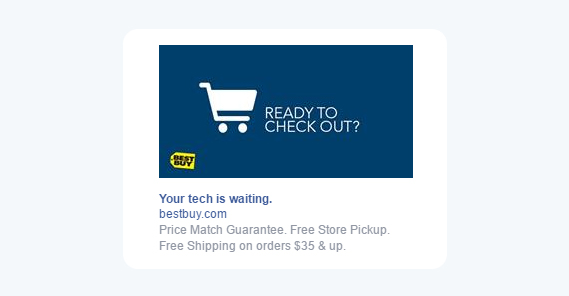
This retargeted Best Buy ad lets you know you have items in your cart and helps ease any reluctance by reminding you of their Price Match Guarantee, free in-store pickup and free shipping.
best buy retargeting ad

Expedia
This ad from Expedia targets last minute shoppers looking for a great travel deal.

expedia advertisement

Behavioral Email Marketing

Behaviorally-targeted email is another example of behavioral marketing. Instead of using the pages that users visited or the actions they took on those pages, behavioral targeting via email targets users based on their status or actions with the site (whether they’re subscribed, added an item to their cart, and so on).

Nordstrom
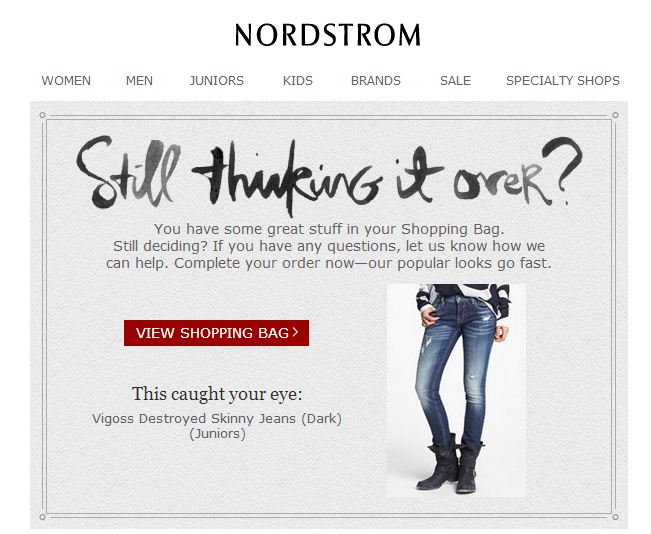
Nordstrom shows you the item(s) in your cart and lets you view your bag directly. This ad could still be improved, however, by linking to a method of contacting support or live chat should the user have any questions before checkout.
nordstrom behavioral email

Birchbox
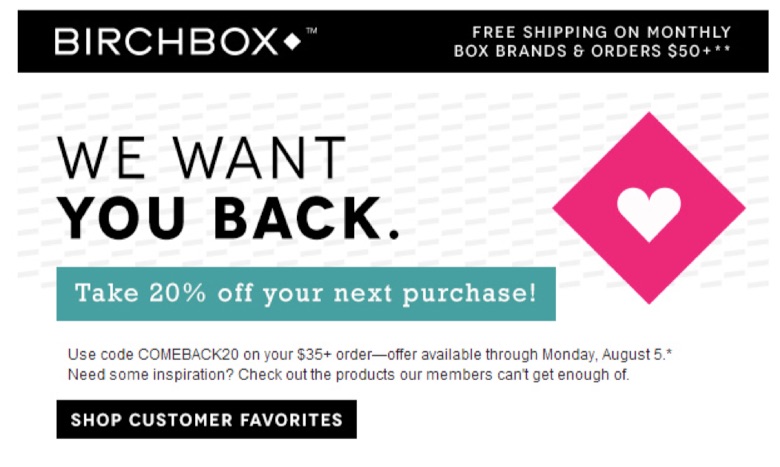
Here’s an example retention email sent to users who unsubscribed from the Birchbox service – with a 20% off discount for rejoining.
birchbox behavioral email

If you’re looking for more examples, we have 29 examples of behaviorally-targeted emails.

How to Set Up Behavioral Email Targeting

You can use Kissmetrics Campaigns to set up behavioral email targeting in just a few simple steps. Watch the video below to learn more:

https://fast.wistia.net/assets/external/E-v1.js

The types of emails you can send through a behaviorally-targeted campaign are virtually unlimited. The most common types include messages like:

  • Abandoned cart notifications
  • Come back/login and see what you’ve missed
  • Onboarding/Getting started emails
  • And much more

Here’s a helpful guide that gives you tons of examples of the different types of behaviorally based emails you can try.

Demographic Targeting

This is one of the most common types of behavioral targeting and looks at things like gender, age range, education level, geographic location, race and other traits to essentially “paint a picture” of a user based on their browsing habits.

You may not think that something as simple as the websites you visit can reveal anything about you on a physical level, but you’d be surprised. And, of course, advertisers are keen to these differences and often repackage and rebrand their products accordingly:
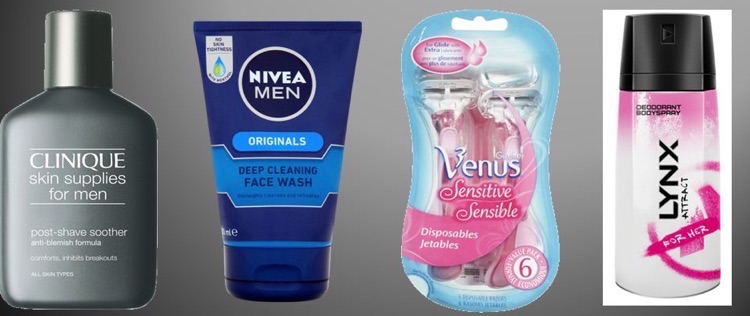
product design colorsProducts geared toward women often contain pink and pastel tones, while those targeted to men have much simpler, conservative designs and colors

Even when you’re not online, demographically-targeted ad examples are all around you:

Toyota
An ad promoting the fuel efficiency of the Toyota Prius – targeted to those who are looking for ways to help the environment:

go green prius

Pepsi
A “skinny” can of diet Pepsi targeted to women who are trying to watch their figures

the new skinny can

Not surprisingly, you can target your behavioral marketing ads to specific demographics of users, right down to their professed interests. Facebook has turned this kind of targeted advertising into a fine art.

Suggested Selling

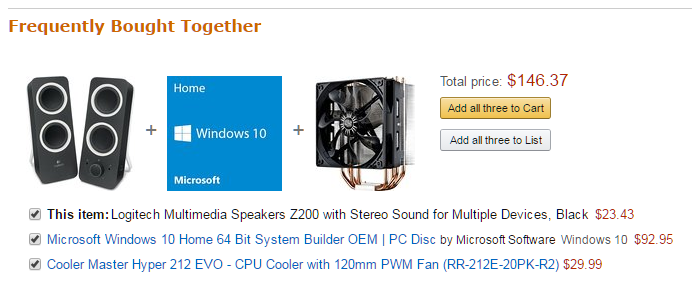
Suggested selling pairs additional (or larger/better) items based on things you’ve already bought. Common examples of suggested selling are up-sells and cross-sells. You can think of a cross-sell as ordering a burger and being asked “do you want fries with that?” Whereas an upsell to your burger would be the offer to “make it a meal with fries and a drink for $X”. Suggested selling is often used to great effect on sites like Amazon, where buying certain items will tell you not just what others bought, but what they bought together.

Amazon
An Amazon behaviorally-marketed suggested sell with the current item, as well as accessories that users often buy in addition to the original.
Godiva
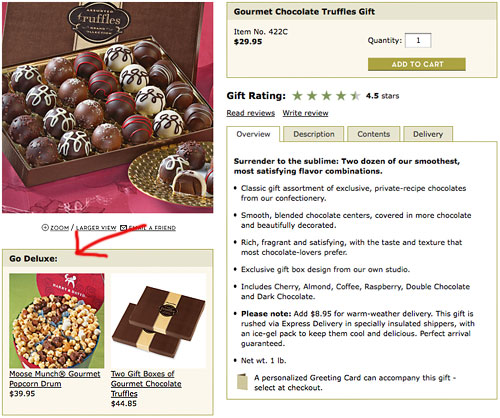
You’ll often see suggested selling used on flower and gift websites, where upsells can include everything from chocolates to popcorn.
go deluxe suggested selling

This is an extension of behavioral marketing in that it doesn’t dissuade the customer from their current order, but rather advises them or suggests other relevant items based on their current purchase behavior.

Taking the Next Step in Behavioral Marketing

Now that you have some powerful examples of behavioral marketing, as well as a wide range of tools and guides at your disposal, the next step is to try it out for yourself! Make a plan, then try out some campaign ideas to see how your customers respond. You may be surprised at the money you’re leaving on the table by not including behavioral marketing as part of your strategies!

And if you are using behavioral marketing tactics as part of your advertising and promotions – we’d like to hear about it! Share your thoughts and success stories with us in the comments below!

About the Author: Sherice Jacob helps business owners improve website design and increase conversion rates through compelling copywriting, user-friendly design and smart analytics analysis. Learn more at iElectrify.com and download your free web copy tune-up and conversion checklist today!


from WordPress https://reviewandbonuss.wordpress.com/2017/07/07/behavioral-marketing-a-closer-look-at-what-gets-consumers-clicking/

Viralism Review : Bonus

Viralism.io solves a massive problem in between its users and their commissions. Have you ever seen big viral media sites like BuzzFeed, ViralNova, or PlayBuzz?

They are making multiple millions per year from free viral traffic, BUT they also have teams of dozens, sometimes hundreds of people who they pay top dollar for. Thus, making it very difficult for the average person to create a viral site at that level.

The new Viralism.io wordpress  plugin, gives you the power of a team of 12 or more. Here is what Viralism do :

  1. Discover Trending Content : Use our plugin to find trending viral stories, YouTube, Vimeo, and Facebook Videos, or images.
  2.  One-Click Viral Publishing : Syndicate viral content to WordPress, Facebook, Twitter and Pinterest with a few clicks of the mouse.
  3. Drip Feed Viral Stories : Setup massive viral campaigns to drip the hottest trending stories over and over to grow your followings.
  4. Get Viral Leads & Sales : Monetize your new found free traffic with optin forms or key native ad placements and affiliate offers.

This wordpress plugin will allow you to discover trending viral content in real time from around the web plus, YouTube, Vimeo, Facebook Video and Images via giphy API and more. Then it will sindicate the content to Facebook Twitter and Pinterest with 1 click.

With automation at your fingers tips, posting content that’s already been proven to attract floods of brand new, fresh visitors to grow your social media followings, share your content and visit your website has never been easier.

Viralism Review

was first seen on : Viralism Review : Bonus


from WordPress https://reviewandbonuss.wordpress.com/2017/07/07/viralism-review-bonus/
Wednesday, July 5, 2017

Video Chief Green Screen Edition Review

Video Chief Green Screen Edition – what is it? Video Chief is one of the largest libraries of video marketing resources that you will ever get your hands on. In version 1.0, customers got access to over 600 video templates, script templates, voiceover templates and more.

In Version 2.0, Joshua added an additional 200 done for you videos in over 10 niches that you willbe able to access. That means you will get over 800 videos, scripts, voiceovers and more!

Now in Video Chief Green Screen Edition, Joshua Zamora listened to his customers. The most requested add-on from his customers is to provide Green-Screen ready videos so this will allow you to have full liberty to fully customize their videos however you would like.

In this edition, you are getting over 150+ green screen videos in over a dozen niches plus the other 1,000 video marketing templates from version 1.0 and 2.0!

Video Chief Green Screen Edition Review

Video Chief Green Screen Edition allows you to customize each template as much or as little as you’d like. Either way you can rest assured you will be making some amazing videos. Use our full videos as-is or customize them with the script and voice over templates.

Every single video and audio track inside members area is ready to be exported in FULL HD format. This means export in 1080 HD quality. We do NOT play around with the quality we shoot in. These were all created with the BEST cameras and microphones in a professional studio.

The following post is republished from : Video Chief Green Screen Edition Review


from WordPress https://reviewandbonuss.wordpress.com/2017/07/06/video-chief-green-screen-edition-review/

Inconvenience to Opportunity: How to Tackle the Customer Engagement Gap

We’re living in a new reality.

For decades, companies dictated their interaction with consumers. Brands chose how they would communicate and when to deliver messages.

However, the consumer climate has dramatically changed. Technology has enabled and empowered customers to control the types of conversations they have with companies.

The rising issue is that most companies haven’t adjusted to these new changes. They’re stuck doing things the old way. As a result, their outdated systems lead to unengaged consumers and declining sales.

That’s why it’s so important for teams to create a bridge that closes the customer engagement gap. It’s an opportunity, not an inconvenience, for your business.

Let’s examine how your company can discover hidden inefficiencies and develop solutions to connect with your audience.

Defining Your Customer Engagement Gap

It isn’t wise to use best practices to solve your customer engagement gap. Every eCommerce business operates differently.

On top of that, most companies approach this problem in the wrong manner. They identify whether they have an engagement gap from a limited mindset. Rachel Happe, co-founder and principal at The Community Roundtable, explains the concept:

“We know that customer engagement matters. Yet much of our thinking about engagement remains simplistic. Most current definitions of engagement are bimodal – someone is either engaged or they’re not. But this is a limited view that hampers our ability to manage engagement in meaningful ways.”

So, what should you do instead?

Sit down with your team and define customer engagement for your organization. Some businesses want to boost customer satisfaction, while others desire to increase the average revenue per customer.

Then, you want to analyze the data that affects your goal. For example, tracking your Net Promoter Score can gauge customer satisfaction.

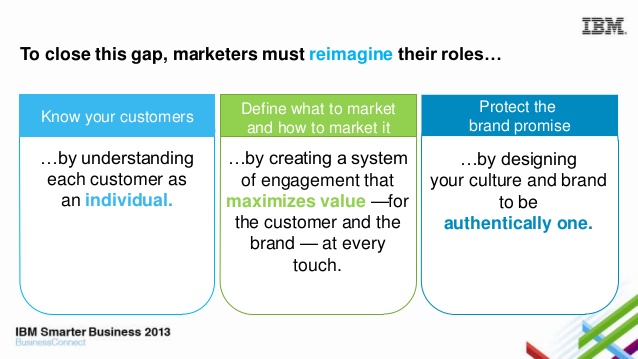
It’s critical that your team reimagine their roles when creating solutions to this problem. The engagement gap doesn’t revolve around the company. Yet, it should focus on the customer, the market, and the brand promise.

IBM reimagine roles engagementImage Source

Move past the old way of closing the customer engagement gap. Your business can achieve more with data and a new holistic approach.

Building Cross-Functional Teams

At some companies, the engagement gap is a singular issue tasked to one team. It’s usually the marketing or customer success department’s responsibility.

Without any push back, that one team maps out a plan with all the bells and whistles—objectives, strategies, tasks, and outcomes. It’s only after the execution of the plan that they realize the need for input from their sales, product, and customer support teams.

Working in silos is common for some eCommerce businesses. Managers miss how every team plays a role in customer engagement. Christy Pettey, contributor at Smarter with Gartner, offers her perspective:

“Although silos are a natural outcome of the way modern business is organized, the poor customer experience that they create can turn customers into ex-customers. Some customers become frustrated and abandon their customer journey altogether, taking their business elsewhere.”

The customer engagement gap can expand across the entire customer journey. It can be the convoluted copy on your website, the misguided messaging from a sales rep, or even long wait times for support tickets.

By building cross-functional teams, your organization can tackle the challenge from multiple vantage points. Every department brings its expertise, and it helps eliminate the misalignment of future goals.

Personalizing the Customer Experience

With new eCommerce businesses popping up every day, the competition to attract and retain customers is fierce. Personalization is driving companies to rethink the customer experience.

Lack of customer engagement can stem from a business’s inability or unwillingness to adapt to their target audience’s needs. It’s visible when brands offer one solution that’s supposed to fix various issues. But customers don’t see the benefit.

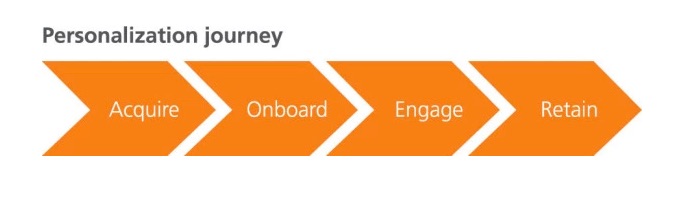
You’ll also notice brands only personalizing the experience at one part of the customer journey. They personalize to acquire the customer, but fail to take similar actions to retain.

acquisition retain customer engagement funnel

The best personalization techniques use data to uncover the likes and dislikes of your customers. With accurate information, you can transform a generic experience into a customized shopping adventure.

For instance, subscription-based men’s clothing service Bombfell leverages data from a customer’s style survey and budget to curate clothing packages. Retailer OfficeMax uses its email subscriber’s location to send targeted campaigns to customers in a specific zip code.

Personalization shouldn’t be a one-off task for your team. Rather, it’s a chance to show customers that you understand their desires.

Collaborating with Your Customers

It’s hard to solve a problem without the necessary stakeholders present. So, it makes sense to add customer collaboration to your strategy.

There are several ways to get feedback from customers. Implied and expressed are two forms of customer collaboration.

Implied collaboration involves customer behavior and how their interactions with your brand affect their shopping experiences. These actions may include the number of times they visit your website, when they open your emails, or their product choices.

From these behaviors, your team can assess what content resonates with customers or which products offer the most benefit to your audience. Implied collaboration doesn’t require the customer to tell you anything; you’re simply making educated conclusions from their actions.

On the other hand, expressed collaboration is directly asking for customers’ opinions. You may request for the customer to fill out a survey or have the customer reply to an email.

It’s also possible to bring your consumers together in a Facebook group to casually address brand engagement. Here’s insight from Danyl Bosomworth, managing director of First 10 Digital:

“One of the most powerful ways to remain valuable is to enable the consumer to connect and share with other like-minded consumers, this allows the like-minded to flock together and simultaneously deliver ongoing insight for the brand hosting the platform.”

To truly turn the engagement gap into an opportunity, you must involve the customer. Find ways to incorporate their feedback into your plans.

Planning Ahead for Future Engagement

The engagement gap isn’t going anywhere. With ongoing advancements in technology and changes in consumer taste, your company must constantly strive for new ways to engage.

And as consumer preferences overlap, you may learn that one of the best strategies is to build external partnerships. Connecting with partners places your product in front of different audiences and strengthens your brand perception in the market.

Brand partnerships range from co-marketing opportunities to revenue-sharing models. The key is to find the right partnership that benefits all parties. Plus, you want the partnership to directly impact your customer engagement goals.

In 2015, CoverGirl teamed up with the Star Wars franchise to create a limited edition makeup line. Because Star Wars is often marketed to men, the partnership encouraged more women to watch the movie. CoverGirl also earned more brand visibility by associating itself with a notable film series.

star wars mascara

Prepare your team for future hurdles in customer engagement. Sometimes, the strategy will involve uniting with other companies.

Filling the Gap with Engagement

There’s been a shift in communication power—from the companies to the consumers. Your target audience can decide when, how, and even if they want to engage with your brand.

Start by defining the problem within your company and build cross-functional teams to develop a cohesive strategy. Personalize the shopping experience with collaboration from the consumer and continue to think about the future of customer interaction.

This is your opportunity. Tackle the customer engagement gap.

About the Author: Shayla Price lives at the intersection of digital marketing, technology and social responsibility. Connect with her on Twitter @shaylaprice.


from WordPress https://reviewandbonuss.wordpress.com/2017/07/05/inconvenience-to-opportunity-how-to-tackle-the-customer-engagement-gap/

Tuesday, July 4, 2017

Easy eStore Builder Review

The following blog post is available on : Easy eStore Builder Review

Easy eStore Builder is a new wordpress plugin that gives you a huge advantage over other dropshipping and affiliate eStore builders with this ‘point and click’ premium store building plugin.

This wordpress plugin has all the features that users can use to create powerful affiliate eStores but also import, markup (increase price) and modify products from Amazon, eBay, AliExpress and Walmart into their own online store in minutes.

With the power to create affiliate e-commerce stores or dropshipping stores, you subscribers will absolutely fall in love with Easy eStore Builder! With this you can now easily import products and its variations and sell at your choice prices.

Everything can be done with a few clicks of the mouse… This is a full blown affiliate and dropshipping e-commerce platform that will allow users to create their own e-commerce empire.

Easy eStore Builder Review


from WordPress https://reviewandbonuss.wordpress.com/2017/07/04/easy-estore-builder-review/

Monday, July 3, 2017

Vidizi Review : Bonus

What Is Vidizi? Vidizi is a push button video software that lets anyone regardless of tech skills or experience creates highly engaging and high converting videos for their social media and advertising in a matter of minutes.

Leveraging Facebook’s 15 second video recommendation, Vidizi is loaded with exclusive video and audio – that’s 100% unique and license-free, plus the ability to upload your own videos and audio as well! It also features a very customizable experience with tex, colors, and looks.

Vidizi transforms what you can do with marketing videos by creating professional high converting videos, using high quality HD videos with simple marketing messeges.

You can even sell these videos to clients – this app can power an entire video service business for social media and advertisers. Check out some of hte amazing features of Vidizi :

  1. 100 Ready to go templates in 13 catagories (these are exclusive, not plr)
  2. Full commercial rights to use with clients
  3. one time lifetime pricing (usually costs monthly)
  4. audio and video upload capability
  5. 100% HD quality videos – export in minutes
  6. Customize each and every elemnt of the video
  7. And so much more…

Vidizi Review

is courtesy of : Vidizi Review : Bonus


from WordPress https://reviewandbonuss.wordpress.com/2017/07/04/vidizi-review-bonus/

Infinity Scalper Review

The blog post was first seen on : Infinity Scalper Review

Infinity Scalper is a special forex indicator that works only on M1 and M5. It can be used on ALL pairs and assets. 100% No Repaint. “Infinity Scalper” generates a green bar for buy signals and a red bar for sell signals.

What is especially interesting about this new indicator tool is a new unique optimal exit feature that allows you to exit earlier than the opposite signal. When Optimal Exit Feature is triggered – the indicator will generate a yellow bar which means that this is a good time to exit the current trade.

This feature lets you grab profit quickly and bypass long boring trades. With all our products you have 3 types of signal alerts and Infinity Scalper is not an exception. Infinity Scalper accompanies every signal by a pop up sound alert, email alert and a push notification sent to your mobile.

Also with “Infinity Scalper” you can switch between 4 different trading styles. You can trade using the default Conservative style or switch to Medium, Aggressive or Custom – if you want to use your own settings. Each trading style has a different set of settings to best suit your proffered trading approach.

Infinity Scalper is designed to work on MT4 platforms. It is NOT an EA or Robot, but a powerful buy/sell signal scalping indicator software. You get smart signals, use them and make profit.

Infinity Scalper Review


from WordPress https://reviewandbonuss.wordpress.com/2017/07/03/infinity-scalper-review/

FB Video Ads Mastery Review

FB Video Ads Mastery is a casu study by Mario Brown about how he’s doing Facebook Video Ads generating Leads for as low as $0.44, getting video views for a penny and converting his landing pages at over 53% with cold traffic.

Facebook just announced that they’re getting 8 Billion video views every single day. This is massive growth and we’d be silly not to leverage that power and the fact that everyone and everything is about video right now.

In this case study Mario is letting you look behind the curtains. He spent his own money to test everything when it comes to FB Video Ads and now he’s handing you all the info on a silver platter.

Mario really dives into it and reveals inside the case study :

  1. His Landing Page Converting at 53% (with COLD traffic)
  2. The EXACT Video Ad & Retargeting Ads He Used
  3. His Exclusive Thank You Page For Authority & Branding
  4. How He’s Getting Leads For As Low As $0.44
  5. Every Test & Result He Got

Imagine how much traffic you can get with that, even if you get just a tiny percentage. Generating leads, getting exposure, creating authority – those are all benefits of using Video on Facebook and in this Case Study you discover exactly what is working now.

FB Video Ads Mastery Review

The following article is republished from : FB Video Ads Mastery Review


from WordPress https://reviewandbonuss.wordpress.com/2017/07/03/fb-video-ads-mastery-review/

Sunday, July 2, 2017

PriceWatcher Review

The post is available on : PriceWatcher Review

PriceWatcher is a great plugin for Amazon affiliates that will have your visitors engage in your site as you give them the opportunity to track prices.

This is the perfect way to keep people from wondering off to an other site and also of course to get the name and email of your visitors.

If you own an affiliate site and not getting your visitors email address you are missing out on a lot of potential commissions. Because if they leave without clicking your link you have no way to ever contact them again.

PriceWatcher is a WordPress plugin that enables visitors to create price alerts for your affiliate products from Amazon, BestBuy, AliExpress and WallMart.

With PriceWatcher the affiliate store owner is able to engage much better with their visitors as they are happily giving their email address in return for the service of a price alert for their desired product. This means more affiliate income for the store owner as now he/she des not lose the visitor.

PriceWatcher Review


from WordPress https://reviewandbonuss.wordpress.com/2017/07/02/pricewatcher-review/

Saturday, July 1, 2017

Simply Viral Review : Bonus

Simply Viral is a cloud-based app that lets you create, schedule and publish highly engaging and viral content on your Facebook pages and groups on autopilot.

SimplyViral sources trending and engaging content from 7 top viral content sites on the planet and lets you pick out the best piece of content for your pages and groups and lets you schedule and post them all.

Here’s everything you can do with Simply Viral : ability to compose, schedule and post links, images and videos to all your groups and fanpages from one dashboard and get the most viral content from 7 top viral sites & post to both your groups and fanpages with ease.

You can schedule these posts as well. These sites are :

  1. Reddit – Search Reddit’s most viral stories by keyword, category or sort them by Hot, Top, Rising, New, Controversial
  2. YouTube – Search YouTube videos by keyword
  3. BuzzFeed – Search BuzzFeed from the main page and 52 categories
  4. Little Things – Auto-Search the most viral stories in Little Things
  5. UpWorthy – Auto-Search the most viral stories in UpWorthy
  6. ViralNova – Auto-Search the most viral stories in ViralNova
  7. Telegraph – Need the breaking news from all around the World? Search breaking news from Telegraph

Besides the most viral news, Simply Viral has the ability to search, post and schedule the most trending content via Google Trends & YouTube Trends Google Trends – Searches the most trending content by country YouTube Trends – Searches the most trending videos by country!

Simply Viral Review

is courtesy of : Simply Viral Review : Bonus


from WordPress https://reviewandbonuss.wordpress.com/2017/07/01/simply-viral-review-bonus/

Friday, June 30, 2017

Video Site Generator Review

The following blog post is available on : Video Site Generator Review

Video Site Generator is a new wordpress theme that brings a wave of fresh air in a saturated world like the WordPress one. 
It has been made with an easy interface, to leave their customers on-site for a lot of time, bouncing from one video to the next.

This theme has an enhanced SEO, and it’s great for Google too, as people will stay in it more than on usual blogs. Each video redirects to a video page, with ads in best positions, and we have an exit intent block to get the user back on watching.

With this new wordpress theme can create unlimited blogs with unlimited videos, about any niche or with your personal videos, that can be easily imported from Youtube and Vimeo. You can also enter SEO descriptions with live links, and Alessandro Zamboni and Stefano Del Grande added also a set of social media share icons.

Video Site Generator Review


from WordPress https://reviewandbonuss.wordpress.com/2017/06/30/video-site-generator-review/

Thursday, June 29, 2017

Pitch from DropMock Review : Bonus

The following post is available on : Pitch from DropMock Review : Bonus

Pitch is a new software developed by Lee Pennington that will help you create high-converting stunning video ads in less than 60 seconds!

Attention-grabbing video ads draw your audience into your story driving conversions and ultimately sales. Until now it took weeks of hard word and a corporate marketing budget to create eye-popping videos sexy video ads.

Here is what you will get if you buy Pitch today :

  • 20 video templates created by our professional videography staff that are highly optimized for video ads. This is not content curation of other people’s work.
  • Advanced editor that adds your message and logo to videos. Comes with designer curated fonts that make video ads hot & ready to convert.
  • 20 music tracks that are optimized for video ads. These music tracks are edited professionally to seamlessly integrate with the Facebook or YouTube ad.

Pitch from DropMock Review


from WordPress https://reviewandbonuss.wordpress.com/2017/06/29/pitch-from-dropmock-review-bonus/

Persuasive SaaS Onboarding Emails: 10 Conversion Lessons Stolen From Attorneys

A successful attorney’s entire job rests on one question: can he persuade the jury to view the case as he does?

If he can, he wins.

Steal these 10 conversion lessons from attorneys to make your SaaS onboarding emails more persuasive and, in the process, increase your conversions.

1. Know Your Goals

How do you know when you’re successful if you don’t have a goal? You can’t. Not having a goal makes successful use of analytics impossible.

A successful attorney — let’s call him John — has two goals in his case. First goal: prove his case, whether his client is innocent or the defendant is guilty. Second goal: a granular goal for each witness and piece of evidence that contributes to the success of his first goal.

To illustrate, imagine John is prosecuting a man for killing his wife. He calls the boat dock attendant as a witness. His goal for this witness? Getting her to admit that she saw the defendant carrying his wife’s limp body onto his boat. This goal contributes towards John’s first goal of proving the defendant is guilty.

So how does this talk of limp bodies and goals work for your SaaS onboarding emails?

You need to show your new user the value of your app. This is your first second goal. You also need to persuade them to pay for your app. This is your second goal.

Assign one goal for each onboarding email in your campaign. Make sure each email’s goal works towards your campaign’s first goal: showing the value of your app. Think of your emails like stepping stones across a lake, guiding your new user towards your first and second goals.

2. Each Question Builds on The One Before

Attorney John builds his case question by question to prove his client is innocent. His questions lead the witness down a path that John wants him to take, so he makes his point to the jury.

John can’t ask a question without laying the foundation for the logic of his next question.

For example, if someone is suing because he fell off a ladder, John might ask: “On January 5th, you walked by the barn and did you see a ladder?”

The witness says, “Yes.”

Now John can ask his next question because the witness confirmed he saw the ladder in question: “That day, when you had this incident, you thought it was a good idea to climb this ladder?”

Notice how John’s first question sets up his second question for the “yes” that he wants.

This strategy is what you want to do with your onboarding emails. Each email lays the groundwork for the emails coming next by explaining one action step that your new user must accomplish to reach your end goal.

Think of building a house. You need to build the foundation before the walls, or you’ll end up with a pile of timber, loose wires, and wet cement.

This where your first and second goals come into play. Each of your onboarding emails’ goals works towards your first, big goal of successful onboarding, like Attorney John’s witnesses contribute towards proving Mr. Defendant is guilty. Figure out your onboarding goal, then use each email to lead your user along the path to complete that goal. If you do that well, your user will also want to convert from a trial to paid user, accomplishing your second goal.

Here’s how: break down your onboarding process into specific steps. Make each step into one email.

Then assemble those emails, so each email logically builds on the one coming before.

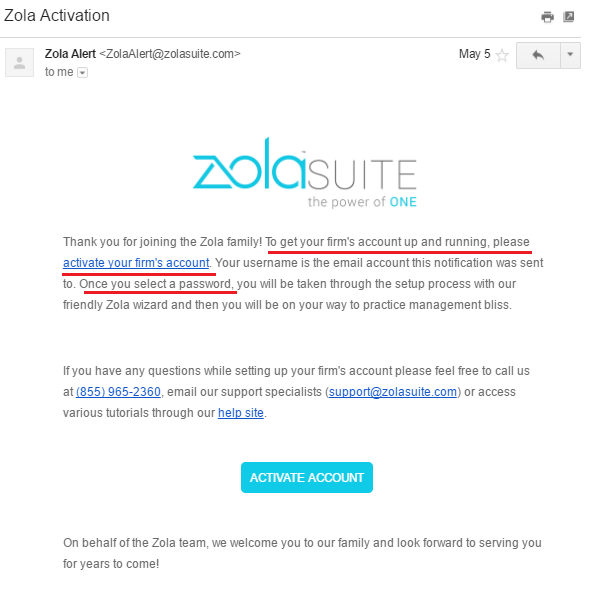
For example, if you signed up for Zola Suite, you need to activate your account to start using the software. You can’t import or organize data without taking this step. So the activation email triggers you to take that step.

zola onboarding emailI underlined your next step: activate your firm’s account by setting a password.

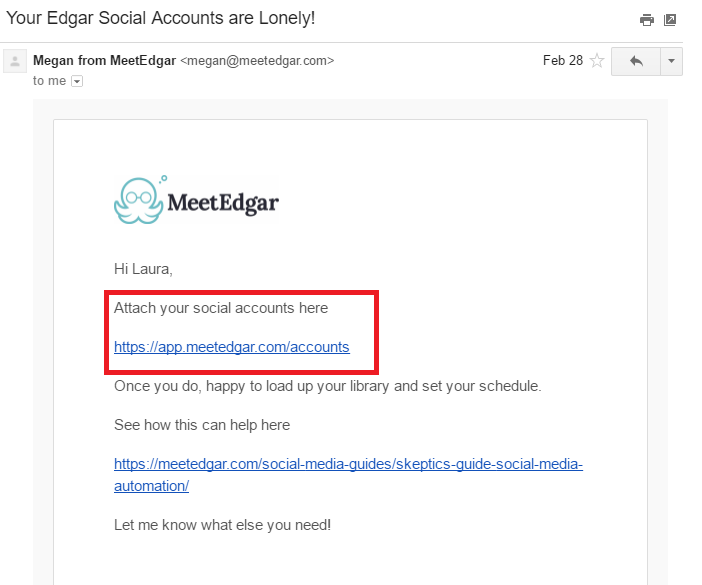
Here’s another example from MeetEdgar. This short and sweet email points you in the direction you need to go.

meetedgar accounts are lonely emailThe red box is your next step: sync your social media accounts.

3. Relevance Is Powerful

“You know, if you don’t want to testify on Tuesday,” I said, “We can always subpoena you and you’ll have to show up whenever is most convenient for us.”

As a litigation paralegal, I was on the phone with a reluctant witness. The attorney I worked for had asked me to get this witness to testify in court in two weeks. The witness didn’t want to.

“But if you work with me a little bit,” I said. “I can work with you. We can schedule this for a day that is better for you.”

Suddenly his demeanor changed. Minutes later, I hung up with the witness’ testimony scheduled for Wednesday at 2 p.m.

Like this witness, your SaaS user only cares about one thing: how will this app improve their life?

Relevance to your user’s life and situation are powerful. Don’t make your user do the heavy lifting on understanding on how your app improves their life. When you show your user how your app benefits their life, your likelihood of getting a conversion skyrockets.

This is your responsibility in your persuasive onboarding emails.

Focus on getting your new user that first success. Here’s how:

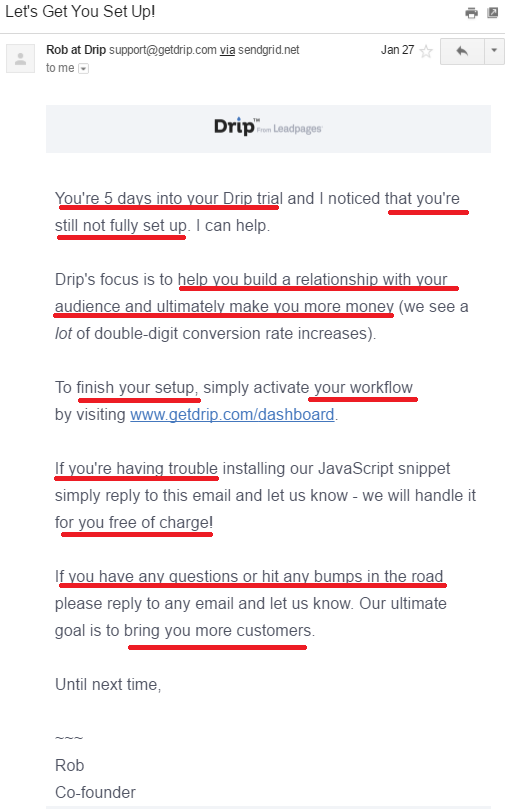
  1. Use more “you” in your emails than “I” or “we” to show relevance to your user’s life. ​​​​​​
    Help your user understand and use your software. What foundation do you need to build, so they’re successful in using your app? How can you set them up for success?

    drip lets get you set up emailI underlined all the spots where Drip says “you.” Focus is squarely on the new user and their success.

    Relevance extends to customer success stories. Customers only care about what your software did for other businesses in the context of what your software could do for their business.

    Use customer success stories that are relevant to your customer’s business and situation. A solopreneur isn’t going to relate to a case study about Home Depot using your app.

  2. Build the first ten days of your onboarding campaign, so your user achieves the aha moment.
    Intercom discovered that the first ten days after your new user signs up for your software are critical. In this period, your new user is pumped to take action and use your app.

    Capitalize on their excitement by helping them achieve the aha moment. Your onboarding emails need to direct that action, so the aha moment is triggered.

    How to figure out your app’s aha moment?

    Lincoln Murphy of Sixteen Ventures recommends:

    The easiest way to figure out what success looks like for your customer – before you can break that down into milestones – is to ask them. What is their desired outcome? How do they measure success themselves? How are they measured by their boss? What are they trying to achieve with your product?

    I’d ask them what ‘success’ means to them first. Do that with several [users] from a similar cohort (if you have multiple types of customers across various use cases – as you often find in very horizontal products – you may want to pick an ideal customer to focus on initially). Analyze that for similarities and patterns. Reduce it down to a handful of absolute required outcomes, and then turn it back to them for approval/buy-in.

4. Break Down Resistance With Humor

If I asked you to come up with five attorney jokes in under five minutes, I bet you could.

Attorneys are universally hated. Even in the courtroom, attorneys are disliked by the judge, jury, and even their own kind: opposing counsel.

Attorney John knows this and uses humor to melt that resistance to win his case.

Pamela Hobbs researched how attorneys effectively used humor as a persuasion tool.

Laughter produces, simultaneously, a strong fellow feeling among participants and joint aggressiveness against outsiders. Heartily laughing together at the same thing forms an immediate bond, much as enthusiasm for the same ideal does. Finding the same thing funny is not only a prerequisite to a real friendship, but very often the first step to its formation.

In short, we like people who make us laugh.

Like the jury eyeing Attorney John with a cocked eyebrow, your new SaaS user is skeptical. They’re wondering: will this app really improve my life?

Talk about resistance. The customer wants to believe your app will help them, but they have been let down many times by empty promises made by crappy software.

Inject some humor into your onboarding emails to break down resistance.

I know what you’re thinking: writing humor is hard. So, instead of forcing the humor — because then it’s not funny — think of your reader as a friend. If it makes sense for your brand, use sarcasm, funny analogies, dry wit, or an unexpected observation to tap into that humor.

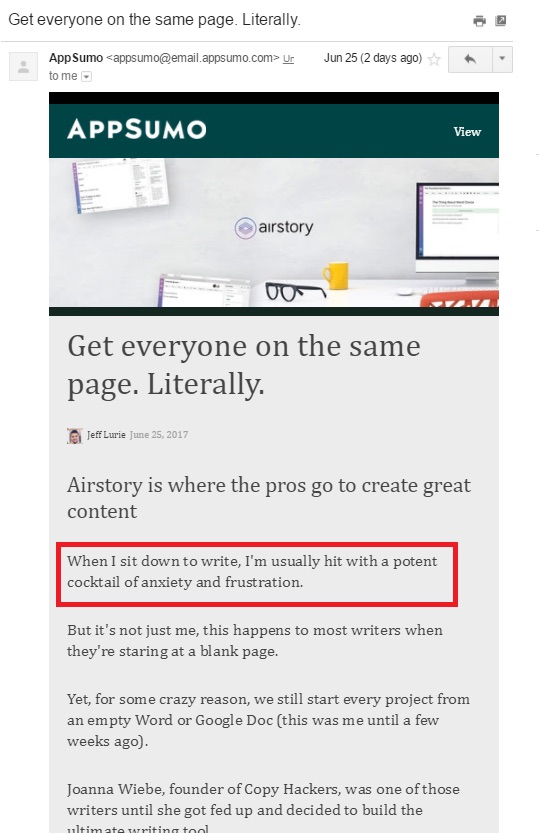
For example, here’s an email I recently got from AppSumo that made me laugh:

appsumo emailThe funny part is in the red box. It’s funny because it’s a relatable, unexpected observation.

5. Research is Vital

What the movies don’t show are the long months of research an attorney does before a trial starts.

This research is the longest part of every case. Attorney John researches each part of his case, investigates all evidence, and interviews the witnesses. The reason for this intense research is simple.

How can he persuade the jury of any fact when he has no context (aka research) for his hypothesis (aka argument) about the case’s events so that he can prove his case?

Research is vital to a case’s success. The same research phase exists for persuasive onboarding emails. For an onboarding series to be successful, you must know vital information about your user:

  • Why they signed up for your software
  • What success for them looks like
  • The specifics of that success
  • What the first step is towards success (the aha moment)
  • What steps are needed to achieve that aha moment

Back to Lincoln Murphy of Sixteen Ventures. He says, “When I talk to someone about optimizing their SaaS free trial for more conversions, as an example, I ask them what a successful free trial looks like for their prospect. And no… it’s not ‘they convert to a paying customer.’ That’s YOUR definition of success; don’t confuse that with THEIR definition of success.”

To create persuasive onboarding emails that convert, you should do research as your first step. Yes, even before you start writing or planning your series.

Here are some questions to start your research:

  • Is your target audience different from your actual users?
  • How your customer uses your software: for its intended use? Or something else?
  • What do you need to know about your user to provide them with a great experience?
  • What does the user need to do to get value from your application?
  • What are the costs and benefits of adding friction to your onboarding process?
  • What is the point when your user sees success in your app?
  • What are each steps needed to achieve that success?
  • At what point in your user’s lifecycle does onboarding need to be completed?
  • What actions must your user regularly take to drive growth and revenue?

6. Create a Consistency Loop

A consistency loop is: “you did this before, so you’ll do it again.”

The first yes is the hardest yes to get. But once you get that first yes, the other ones are easier.

For Attorney John, getting the witness to keep talking to him on the phone instead of hanging up is that first yes.

For your onboarding emails, the first small commitment or first yes is your all-important welcome email. If your customer opens your welcome email, they’ll want to open the rest of your emails. Those subsequent requests are consistent with their view of themselves.

So, make that welcome email darn good.

Here’s how: Set your user up for success. Going back to your research, figure out the first step your user needs to take to get success from your app. Make that first step super easy to take.

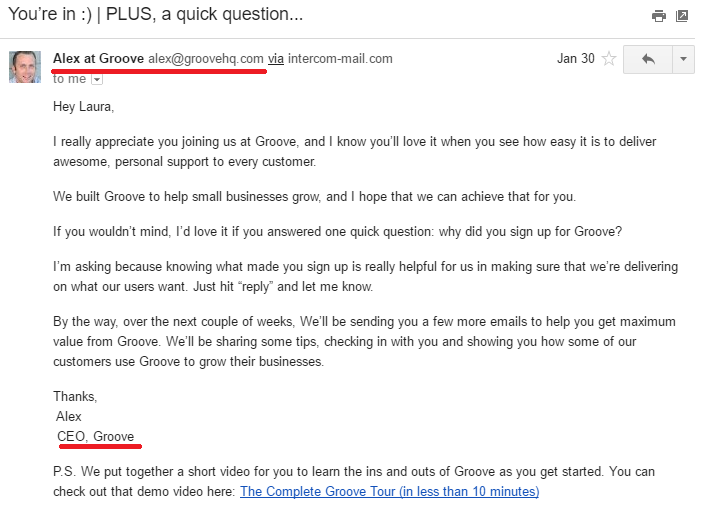
Second, give your welcome email some personality. People want to connect with other people. Give a glimpse of the human personalities behind your software. Some SaaS companies, like Groove, have the welcome email come from the CEO.

groove ceo emailLook, there is a person behind this software. And he’s friendly and nice. You feel welcomed, don’t you?

7. Invoke Emotions

Research has found that the effect of emotions on decisions of any kind is not random or a sweet side bonus. Emotions are powerful and predictable drivers of decision making.

Attorney John knows this, so he uses emotion in his opening statement to set up the case and tap into those emotions.

Maybe he taps into the most powerful emotion: anger. He slants his case in an “us versus them” mentality, or a call to “fight our quick-fix litigious society,” or a warcry of “don’t let evil triumph in the world.”

Steal his secret and trigger an emotion in your new user, like excitement or hopefulness.

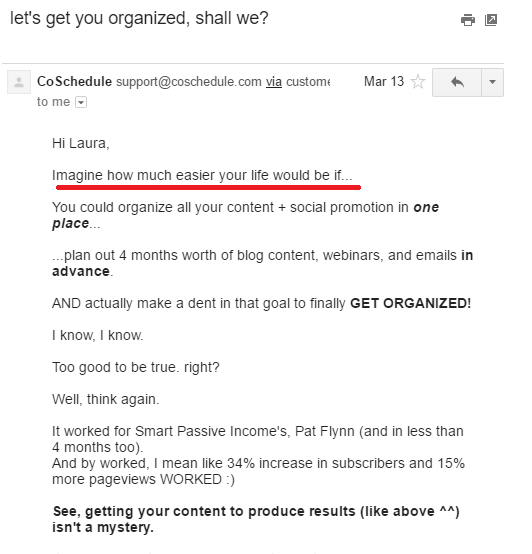
Stirring your new user’s imagination with story-based email copy is how you tap into that emotion. Paint a picture by telling a story and getting your user to imagine the pain-free life after being onboarded.

emotion in emailThis email starts right off with telling you a story and getting you to imagine your life pain-free.

8. Put Your Message Into Context

“As you were getting your beer, the lights went down in the auditorium,” the defense attorney asks the plaintiff. “And you heard the guitar start playing and you panicked. So you started to run. Wouldn’t you say that’s why you didn’t see the water on the floor and you fell because you were missing the start of this show that you’d driven 500 miles to see?”

Plaintiff’s counsel asks the same question, but in a different way: “You came around the corner and didn’t see the puddle of water right next to the auditorium’s curtain, because the hallway was dark and the curtain was closed, correct?”

The difference between the two questions is in the framing.

“Framing means packaging information,” says Stuart Diamond, author of Getting More: How to Negotiate to Achieve Your Goals in the Real World. “Or presenting it using specific words and phrases that will be persuasive to the other party. The idea is to give people a vision of what the key issues are. If a restaurant is late with your reservation, ask, ‘Does this restaurant stand by its word?’ Or, to any service provider, ‘Is it your goal to make customers happy?’ Figuring out how to frame things comes from asking yourself the question, ‘What is really going on here?’”

For your onboarding emails, you should frame your message to let your new user see all the benefits of your software.

Here are three ways to use framing in your emails:

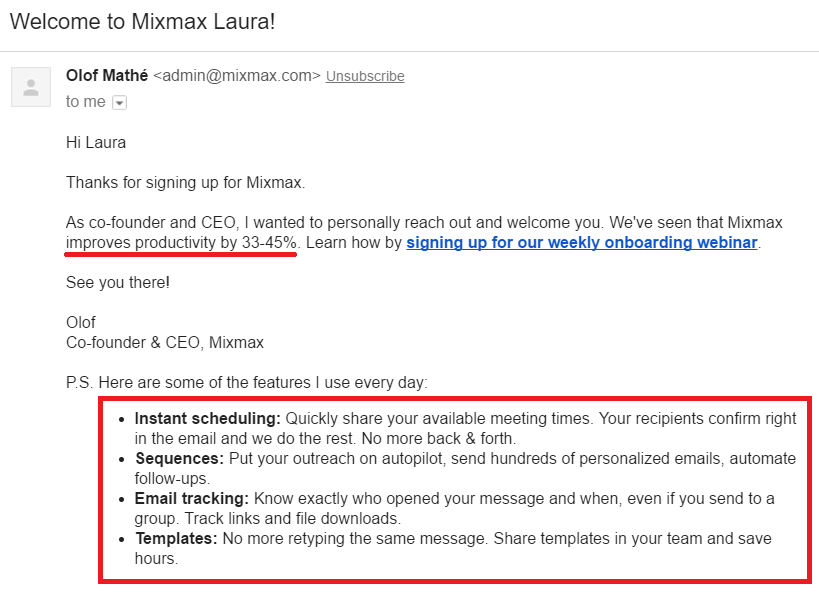
  1. Provide a quick recap of why your user signed up. Your welcome email is a great spot to include this information as Mixmax did.

    mixmax welcome emailI marked all the benefits you get from using Mixmax. Makes you want to use it, right?

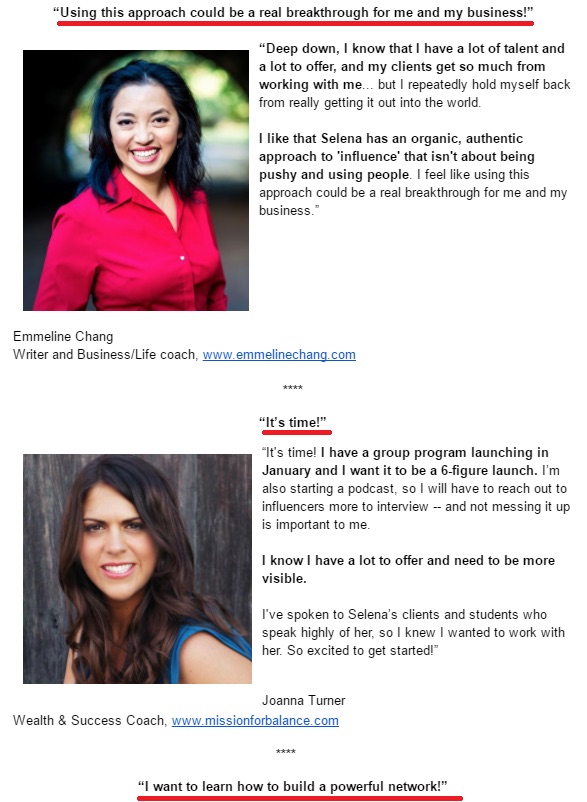
  2. Add a little line or headline above your testimonials to give a snapshot of the testimonial. Connect the dots for your user between your email copy and the testimonial like Selena Soo did in this email.

    testimonial emailI underlined where the framing happens. She puts the testimonial into context, making it more powerful.

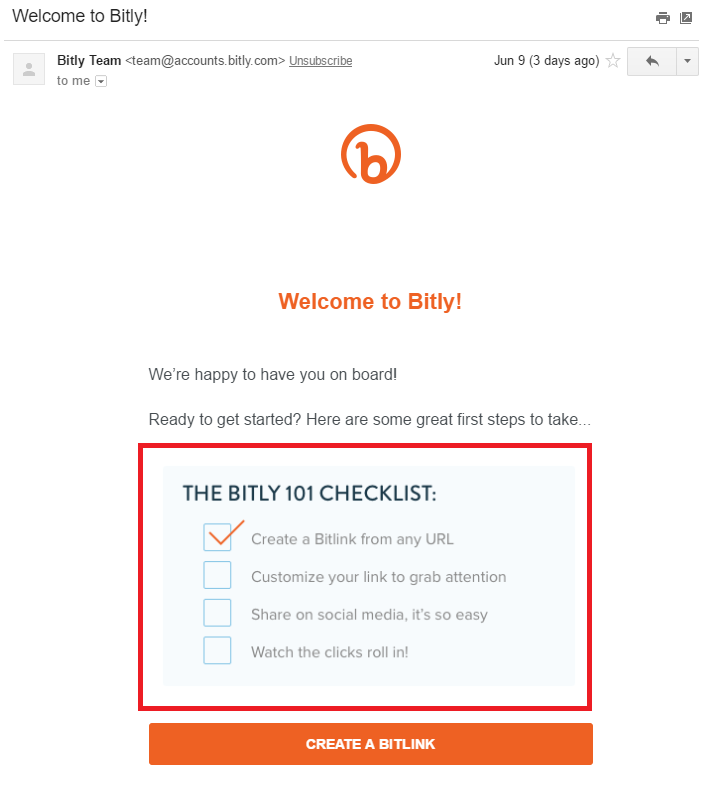
  3. Give an update on your user’s progress in onboarding and tell them what that means. Check out how Bitly did that in this email.

    bitly onboarding emailBonus points to Bitly for already checking off one to-do on this list. It gives you a sense of accomplishment.

9. Show and Tell a Story

Attorney John knows he’s just an actor putting on a story for the jury. He brings in supporting actors in the form of witnesses to play out the story and support his case. In the process, he gives nonverbal commentary to help the jury understand the plot with an eyebrow cocked in skepticism or the way he phrases his questions.

Then he layers on another persuasion technique: storytelling. His entire case is a story about the events that lead up to this trial.

For your onboarding emails to convert, steal Attorney John’s persuasion tactic: show and tell a story.

Joanna Wiebe, founder of Copy Hackers and co-founder of Airstory, explains:

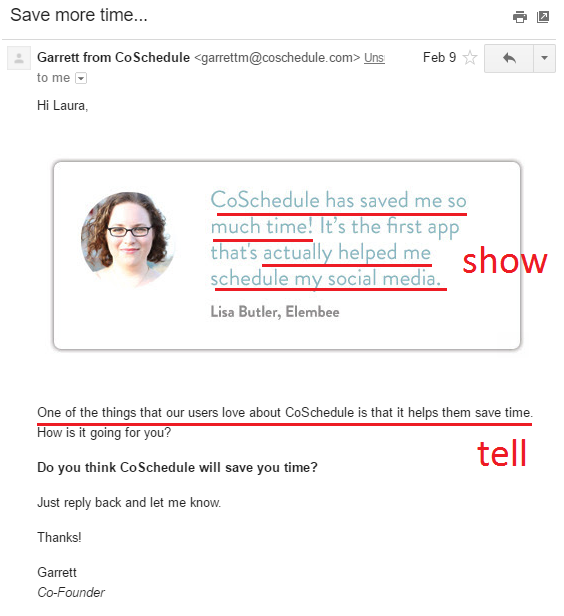
If you don’t tell, you risk leaving the best messages implied. Implying is BAD in conversion copywriting. Because there is too much room for error/interpretation when you imply. The idea is to SHOW then TELL. First, show them what’s different or awesome about you. Follow that up by explaining – in clear, meaningful words – what you’ve shown them, what you’ve implied.

To do this in your onboarding emails, show in your screenshots and testimonials, and tell in the copy you write. Tell your new user explicitly what your app does and how it will benefit their life. Then, show them a story to cement that idea.

coschedule testimonial sales emailTop half of email: shows what’s different about CoSchedule. Bottom half: tells what’s different.

10. Don’t Be Afraid to Sell

Attorney John’s job is to advocate for his client. At the end of his case, he must ask the jury to do something. Usually, that ask ties directly to his end goal. For his case to be successful, his ask must be clear.

If he didn’t ask, he would fail at his job.

If you don’t ask, your emails will never convert.

Your onboarding emails have an end goal: to properly onboard your new user and show them the value of your app. For your onboarding to be successful, your new user will want to pay, so the app is permanently in their life. In other words, a paid conversion.

I see too many onboarding emails skimp on that ask. Don’t be timid or shy about it.

Ask for the action you want your user to take and make it obvious how it benefits your user’s life.

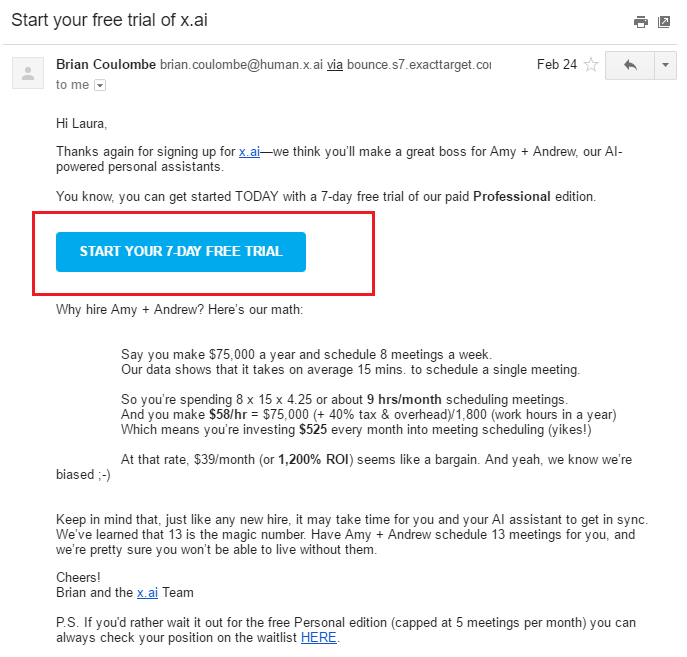
Ask clearly and remove any barriers about confusion like multiple CTAs in one email, hesitancy in asking, or not showing her the positive impact your app will have on their life.

x.ai onboarding email trial offerx.ai’s ask is underlined in red. Notice there is only one CTA and you know exactly what you get by clicking that button.

Second, make it an easy action that your user must do to complete your ask. For example, when you ask them to pay for a year subscription, lead them directly to a checkout page with as much information pre-filled in as possible. Don’t litter the path with hidden work in your onboarding emails.

Last, like a good attorney who explains to the jury how to fill out the verdict form so he wins and they can all go home, take your user through each step of your ask. Explain how they’ll capture her brilliant ideas immediately using your app like Evernote, and they’ll never again scramble for a pen and paper while their genius idea floats away, lost forever.

Bottom Line

Instead of reading about these persuasion tactics that attorneys use, you might find it helpful to see and hear them in person. If so, head to your local courthouse to catch a trial and see persuasion in action.

My recommendation is to see a civil trial. In these cases, parties are fighting over money, so fewer emotions clutter the courtroom than in a criminal or family law case where jail time, divorce, or child custody are determined. That makes it easier to see the persuasion tactics at play.

Persuasion is a subtle art and one that some attorneys wield better than others. If you see a trial in person, stick around long enough to see at least two attorneys question a witness.

But even if you don’t see a trial, channel Matthew McConaughey’s attitude from The Lincoln Lawyer and steal these 10 persuasion tactics for your onboarding emails and a taste of attorneys’ conversion power.

About the Author: Laura Lopuch is an email conversion engineer for SaaS and e-commerce companies. Her specialty is crafting persuasive onboarding email sequences. Want a welcome email that creates a consistency loop, so your users say “gimme more”? Get my essential checklist and revolutionize your welcome email against boring nothingness.


from WordPress https://reviewandbonuss.wordpress.com/2017/06/29/persuasive-saas-onboarding-emails-10-conversion-lessons-stolen-from-attorneys/